
Thinking about closing your account for good? If you’re searching for how to delete Cash App account, you probably want a clear answer without confusion.
Whether you’re switching payment apps, concerned about privacy, or simply no longer using the service, this guide will walk you through how to delete your Cash App account permanently—the right way.
We’ll also cover how to delete Cash App account on phone, what happens after deletion, and important things to do before closing it.
What Is Cash App?
Cash App is a popular peer-to-peer payment app that allows users to:
-
Send and receive money
-
Invest in stocks and Bitcoin
-
Use a debit card
-
Direct deposit paychecks
But sometimes, users decide it’s time to move on—and that’s completely fine.
Things to Do Before You Delete Cash App Account
Before learning how to delete my Cash App account, there are a few critical steps you shouldn’t skip.
1. Withdraw Your Balance
Make sure your balance is $0. Transfer any remaining funds to your bank account.
To withdraw:
-
Tap Money
-
Select Cash Out
-
Choose transfer speed
-
Confirm the transaction
2. Sell Investments (If Applicable)
If you’ve invested in stocks or Bitcoin, sell them and transfer the funds before closing your account.
3. Download Transaction History
For tax or record-keeping purposes:
-
Log in at cash.app via browser
-
Go to Settings → Documents → Account Statements
-
Download your transaction history
Once you delete Cash App account, access becomes limited.
How to Delete Cash App Account on Phone
Now let’s get to the main question: how to delete Cash App account on phone.
Follow these steps carefully:
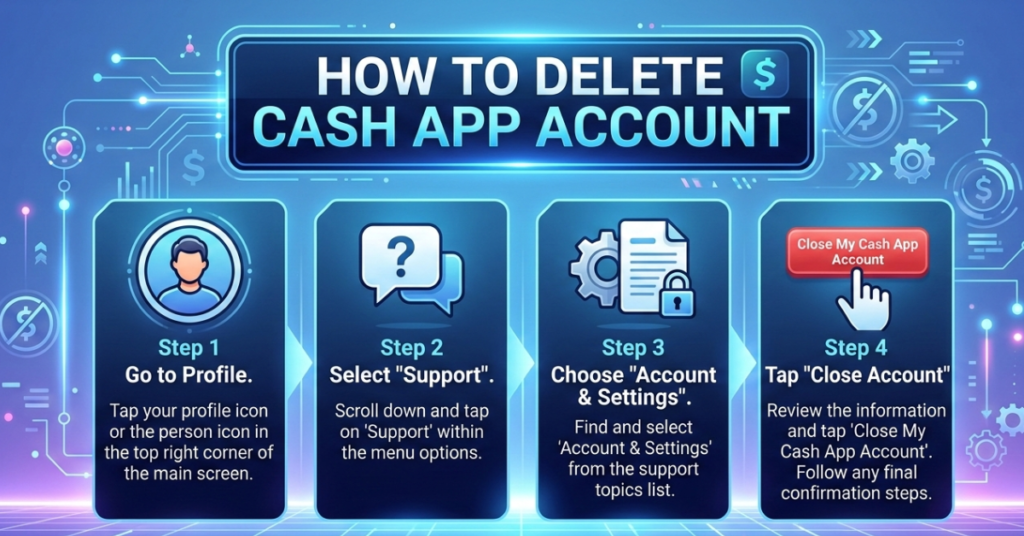
Step-by-Step Guide
-
Open the Cash App on your iPhone or Android.
-
Tap your profile icon in the top-right corner.
-
Scroll down and tap Support.
-
Select Something Else.
-
Choose Account Settings.
-
Tap Close Account.
-
Select Confirm Closing Account.
That’s it. Your Cash App account will be scheduled for closure.
How to Delete Cash App Account Permanently
If you’re wondering how to delete Cash App account permanently, here’s what you need to know:
-
Closing your account disables your $Cashtag.
-
You cannot access payment history inside the app.
-
Linked bank accounts and cards are disconnected.
-
You’ll need to create a new account if you return.
Permanent deletion means the account is deactivated. However, some data may be retained by the company for legal and compliance reasons.
How to Close Cash App Account from Desktop
If you prefer using a computer:
-
Log into your account at the official Cash App website.
-
Go to Settings.
-
Find the option to close your account.
-
Follow verification prompts.
If the option isn’t visible, contact support directly through the app.
What Happens After You Delete Your Cash App Account?
Once you delete your Cash App account, here’s what changes:
-
You can’t send or receive money
-
Your Cash Card becomes inactive
-
Your $Cashtag becomes unavailable
-
Direct deposits stop
Make sure no pending transactions are processing before closing.
Common Reasons People Delete Cash App Accounts
Users choose to delete accounts for various reasons:
-
Switching to another payment app
-
Privacy concerns
-
Too many financial apps
-
Account security worries
-
No longer needing peer-to-peer payments
Whatever your reason, the process is straightforward if done properly.
Security Tips Before Closing Your Account
If security is your concern:
-
Enable two-factor authentication before logging in
-
Remove linked bank accounts
-
Change your email password
-
Check for unauthorized transactions
If your account was compromised, contact support before deletion.
Read also <<< How Can I Contact Netflix by Telephone?
FAQs
1. How do I delete my Cash App account permanently?
Go to Profile → Support → Something Else → Account Settings → Close Account → Confirm.
2. Can I delete app account without logging in?
No. You must access your account to close it. If you can’t log in, contact support.
3. What happens to my money if I delete my account?
You must withdraw all funds before closing. Remaining balance may cause delays in account closure.
4. Can I reopen my deleted Cash App account?
No. Once closed, you’ll need to create a new account using your email or phone number.
5. How long does it take to delete a Cash account?
Account closure is typically immediate after confirmation, though backend processing may take some time.
Final Thoughts on How to Delete Cash App Account
Learning how to delete Cash App account isn’t complicated—but doing it correctly matters.
Here’s the quick recap:
-
Withdraw your balance
-
Download transaction history
-
Sell investments
-
Close account via Support settings
-
Confirm deletion
If you’re switching financial tools, take time to research alternatives that fit your needs better.
Deleting your account is easy. Doing it smartly protects your money and your data.